¶ Starting a homelab
¶ Things to know before setup
Research...first know how to make your setup secure:
https://www.reddit.com/r/selfhosted/comments/pufhs0/beginner_guide_how_to_secure_your_selfhosted/
Often when homelabbing you will be constantly building and tearing down as you learn how things work. Having a plan of how you want to set your network up helps as you may end up having to redo your entire network for reconfiguration.
Where to place resources, in DMZ, in a VM/container/bare metal, how to make it so that resources can see each other easily.
https://joekarlsson.com/2023/09/how-to-get-started-building-a-homelab-server-in-2024/
https://www.reddit.com/r/homelab/wiki/introduction/
https://benheater.com/how-to-start-your-home-lab/
https://www.reddit.com/r/selfhosted/wiki/index/
Are you wanting a domain so services can be port forwarded?
I currently went with Cloudflare and am using supersecrethomelab.com cost was around $10 a year. They come with a nice dashboard and a bunch of extra features if desired but we will be setting those up and hosting them ourselves.
NUT capatibility list: https://networkupstools.org/stable-hcl.html
Kinda like this one: https://www.amazon.com/Eaton-Electrical-5S1500LCD-External-Black/dp/B00DK45T68/ref=sr_1_1?crid=1ZPO1BY9IOCXB&dib=eyJ2IjoiMSJ9.uXtUdA6txJvZ6DbD_u_RqvBubmiKs_-3gND5OWPYgHX1p3NPVKAChQlOosMikMIEq4Tr9u8eJwYQfyWIbX0hTI8gnJF9_QWoQGHyBsahS3kNXmK3EOb6t7RPSOj3qHYXGVukLs2D4pZ6IUjC2pN2KHdWPfuYVSXJGMrvSDunXbRFTqC-nnIGeWia0Hkp4_VUMUmFFTaE_KSHyDOeLT8hmmbwrszZa3WfBh3zY37CLNRaAruiYQgCpCw3J_5ptsmQNKacLnTNTnnbBn8HVYAj7eECTwrP1g7oAB2vBHSkC3c.44YaY8KkGBO3kt2OM_7zqorvlvCWthxMOa-XyU5f6tg&dib_tag=se&keywords=eaton%2B5s&qid=1720137230&sprefix=eaton%2B5s%2Caps%2C112&sr=8-1&th=1
¶ Hardware
¶ 1. Overkill Router - 12th Gen Intel N100 Firewall Router 4x i226-V 2.5G LAN: $290
This Router will also be used as a firewall IDS/IPS. The Router OS Opnsense also has other capabilities like Wake on Lan, NUT server (used with UPS)
I went a little oveboard with the specs and could have went with a 8gb RAM 128 Gig SSD for $180
While it is advertized as a fanless, it overheats at idle. I ended up getting a usb fan.
¶ 2. Managed Switch - 2.5 gig managed switch with 2x 10gig ports.
¶ 3. UPS - APC UPS 1500VA Sine Wave UPS: $270
Reason for getting this UPS? Explained a little bit from this thread.
¶ 4. CPU for transcoding. i5-14500 $191
Transcoding is what is used if runing a mdia server like Plex, Jellyfin, or Emby for streaming video. https://blog.ktz.me/the-best-media-server-cpu-in-the-world/
¶ 4.5 CPU cooler. Noctua NH-D15 $70
Great Air Cooler.
¶ 5. NAS (Network Attached Storage) [running total] 191+467+313+1100+100
There are different NAS devices, Synology, Ugreen, or repurposing an old desktop. I'm currently eyeing a 15 bay drive from 45Drives. https://www.45drives.com/products/storinator-av15-configurations.php
https://technotim.live/posts/hl15-review/
Of course always looking for a deal so checking craigslist, facebook market place, and ebay.
Looking at other person's setup. https://perfectmediaserver.com/01-overview/alexs-example-builds/#__tabbed_1_1
Do I want Storinator or do I want Rosewill https://www.newegg.com/rosewill-rsv-l4500u-black/p/N82E16811147328
¶ 5.5 6x Drives Seagate Exos 2X18 ST18000NM0092 18TB 7.2K RPM SATA 6Gb/s 512e Dual Actuator 3.5in Recertified Hard Drive $1,100
A good website for drives that I have encountered is https://serverpartdeals.com/ They sell new and refurbished drives with a 3-5 year warrenty.
New Seagate Exos X20 20 TB
New: $370
Manufacture recertified: $240
¶ RAM Kingston ECC 128GB - $467
This RAM was not compatible with the Motherboard. Figured all DDR5 works....check the motherboard manufacturer.
https://www.asus.com/us/motherboards-components/motherboards/workstation/pro-ws-w680-ace/helpdesk_qvl_memory?model2Name=Pro-WS-W680-ACE
$180 for 1x 32GB stick...
¶ Motherboard Asu Pro WS W680-ACE $313
This had support for ECC memory
¶ PSU EVGA SuperNOVA 1000 T2 1000 W 80+ Titanium Certified Fully Modular ATX Power Supply $100
¶ HBA RAID card in IT mode - $25
I went with a "9207-8i HBA Card IT Adapter for LSI SAS2308 Chip+2*SFF8087 Cables SAS to SATA"
Since I will be virtualizing my NAS instead of running it on bare metal, I will be needing a HBA card in IT mode so that I can use PCI passthrough so the VM will have full authority over the drives.
https://www.truenas.com/blog/yes-you-can-virtualize-freenas/
Go with 9300-16i for 16 more drives. Might have to be put in the pcie 4.0 slot due to mobo only have pcie 3 x4
¶ Case Fractal Design Meshify 2 XL - $124
Another good subreddit. https://www.reddit.com/r/DataHoarder/
NAS and Drives be EXPENSIVE!!!$$$
https://www.newegg.com/black-fractal-design-meshify-2-xl-atx-full-tower/p/N82E16811352137?Item=N82E16811352137
This case is said to be able to handle 18 HDD
For slimSAS cable....do I NEED it to be SFF-8654?
¶ What I have done. Possible differences due to hardware.
It would have been great to start building your network by setting up your DHCP, DNS, Proxy, VPN, and Firewall first...unfortunately I was waiting for hardware to come in the mail so I started with vm/containers first. In hindsight it would be better to start setting up SSL/TLS security certificates as setting up any other service (NAS, Media server, dashboard, website/blog) will want these during configuration unless you want to go back to each one after setup.
Enable PCIE passthrough for vms/containers. This may be different with other devices but with mine It was enabling IOMMU in the bios. looks like others have issues "PDK and RMRR Compatibility Issues on the HP Proliant DL360e G8."
Following this guide helps.
https://3os.org/infrastructure/proxmox/gpu-passthrough/igpu-passthrough-to-vm/?h=igpu#proxmox-configuration-for-igpu-full-passthrough
GRUB_CMDLINE_LINUX_DEFAULT="quiet intel_iommu=on
To turn IOMMU on, look in bios for passthrough? Then enter
GRUB_CMDLINE_LINUX_DEFAULT="quiet intel_iommu=on" in /etc/default/grub
Then add this into /etc/modules:
vfio
vfio_iommu_type1
vfio_pci
vfio_virqfd
There is a problem with doing this on very new hardware...the documentations don't follow 1:1
It doesn't show me "DMAR IOMMU enabled" I just had to know what device to try to passthrough to the VM.
The command below shows the iGPU and a Nvidia GPU
lspci -nnv | grep VGA
00:02.0 VGA compatible controller [0300]: Intel Corporation AlderLake-S GT1 [8086:4680] (rev 0c) (prog-if 00 [VGA controller])
01:00.0 VGA compatible controller [0300]: NVIDIA Corporation GA102 [GeForce RTX 3090] [10de:2204] (rev a1) (prog-if 00 [VGA controller])
Websites that i referenced.
https://jellyfin.org/docs/general/administration/hardware-acceleration/intel
https://github.com/linuxserver/docker-jellyfin
https://forum.proxmox.com/threads/igpu-passthrough.129076/
https://3os.org/infrastructure/proxmox/gpu-passthrough/igpu-passthrough-to-vm/?h=igpu#proxmox-configuration-for-igpu-full-passthrough
For passing the GPU for Folding@Home I saw these and followed:
https://sequr.be/blog/2020/04/installing-folding@home-to-fight-covid-19/
https://pve.proxmox.com/wiki/Linux_Container#pct_container_images
https://foldingathome.org/v7-linux/
https://www.reddit.com/r/homelab/comments/b5xpua/the_ultimate_beginners_guide_to_gpu_passthrough/
10de:2204
This might help with GPU passthrough to LXCs. It will auto update gpu drivers and pass that update to LXC as well.
https://yomis.blog/nvidia-gpu-in-proxmox-lxc/
Some video said to add blacklist. drivers that proxmox utilizes for video card. Don't want these loading up at all.
nano /etc/modprobe.d/blacklist.conf
blacklist nouveau
save
update the initialization ram filesystem
update-initramfs -u
apt install build-essential
wget https://us.download.nvidia.com/XFree86/Linux-x86_64/550.144.03/NVIDIA-Linux-x86_64-550.144.03.run
chmod +x nvidia.....
RECCOMMENDED:
https://github.com/oddmario/NVIDIA-Ubuntu-Driver-Guide?tab=readme-ov-file#-installing-through-the-graphics-drivers-ppa-repository-recommended
install drivers from some PPA repository: the .run ends up overwriting some files apparently...don't know what
sudo apt install pkg-config libglvnd-dev dkms build-essential libegl-dev libegl1 libgl-dev libgl1 libgles-dev libgles1 libglvnd-core-dev libglx-dev libopengl-dev gcc make
sudo add-apt-repository ppa:graphics-drivers/ppa
sudo apt update
sudo apt install nvidia-driver-560
reboot
Instead of '560' add whatever one you are currently wanting.
https://launchpad.net/~graphics-drivers/+archive/ubuntu/ppa
If you screw up you can uninstall any Nvidia drivers from APT repository
sudo apt-get remove --purge '^nvidia-.*'
sudo apt autoremove
reboot
I had to first install linux-headers
Got it working....but what did I do?
This I think was the main last one. https://www.reddit.com/r/Proxmox/comments/1ip0ba7/remove_gpu_settings_from_proxmox/
There is only 1 blacklist item, nouvua
did pve headers
wget the latest stable drivers from Nvidia website (don't forget to make it runnable by doing chmod +x)
put three pcie passthroughs in lxc hardware
push the driver to the lxc and ran again from within the lxc
reboots, many reboots
Same thing.
On the host:
-
Install pve-headers
apt-get install pve-headers -
Make sure your GPU is present
lspci | grep -i nvidia
Install the Nvidia drivers, Use the Installer from the nvidia website.

Make sure you're loading the right kernel modules, Create /etc/modules-load.d/nvidia.conf and put the following in it. nvidia_uvm is required for cuda compute and isn't loaded by default. If your shit doesn't let you run cuda or video encode stuff this is why.
nvidia-drm
nvidia
nvidia_uvm
Create a udev rule for the device, /etc/udev/rules.d/70-nvidia.rules paste the following. This creates special devices with more permissive permissions.
KERNEL=="nvidia_uvm", RUN+="/bin/bash -c '/usr/bin/nvidia-modprobe -c0 -u && /bin/chmod 0666 /dev/nvidia-uvm*'"
KERNEL=="nvidia", RUN+="/bin/bash -c '/usr/bin/nvidia-smi -L && /bin/chmod 666 /dev/nvidia*'"
reboot
¶ Updating BIOS
This was a pain.
Had previously enabled IOMMU in BIOS to virtualize iGPU of CPU so I can use Intel QuickSync for transcoding for media server.
Everything working fine, life is good.
Unplugging monitor from server and rebooting (Gimme my 3rd monitor back) stops IOMMU as BIOS detects discrete graphics card and says 'no iGPU for you'
Time to update BIOS
Need to update Intel ME firmware first to help 'optimize system settings' before updating BIOS
Need to update/install Intel ME drivers first before firmware
Drivers are Wandows only
Boot up Windows USB, Install drivers, firmware, reboot and finally update BIOS
Realize that I probably only had to enable multi monitor setting in BIOS and didn't need to do the update.
used this for usb Windows: https://www.hirensbootcd.org/usb-booting/
¶ Preface
Suggested list of setting up your own network.
- "Passive Router" cooled it from ~55C to ~32C. The other device used will have a proxmox hypervisor installed. I picked out an old enterprise HP DL380 G9 server.
Note that it is not suggested to use Consumer SSD's in a server setting as they will wear out faster. Mine have been more idle as of yet so I do not have much experience but that is what I have heard during my experience.
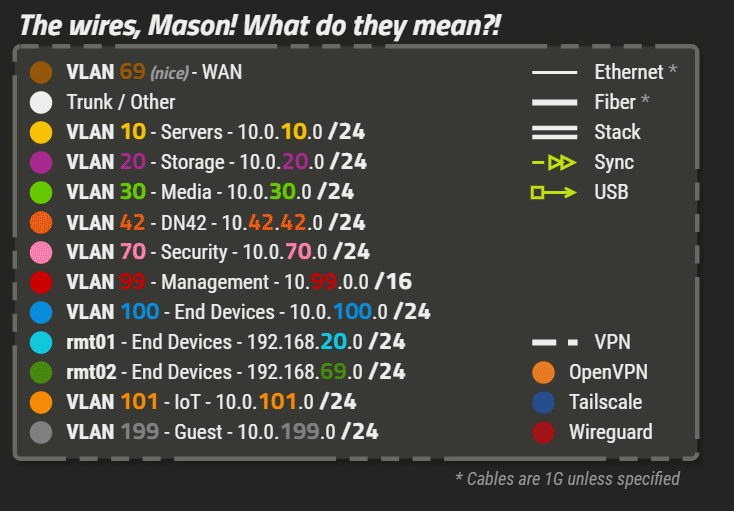
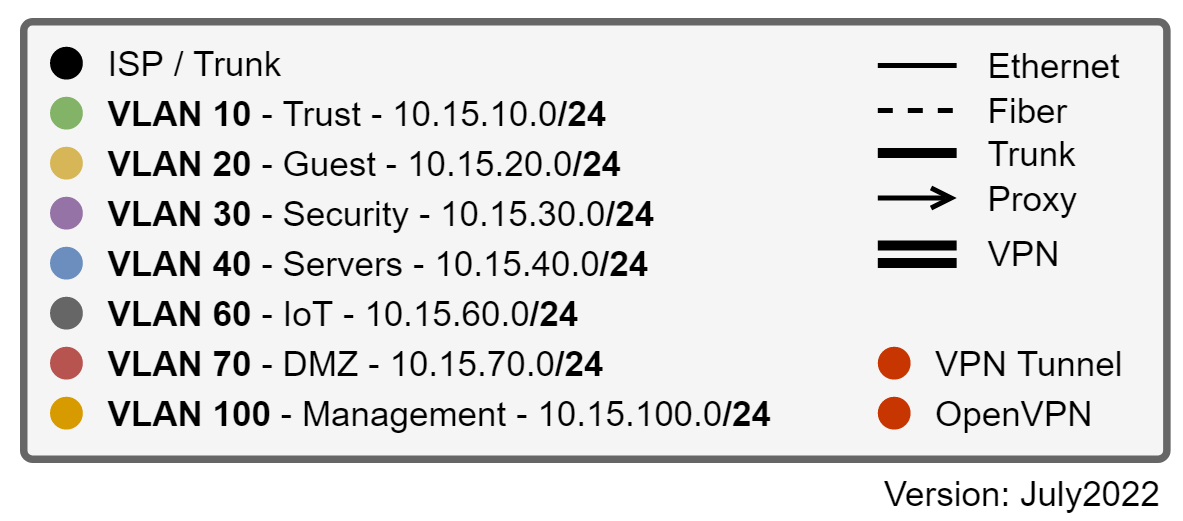
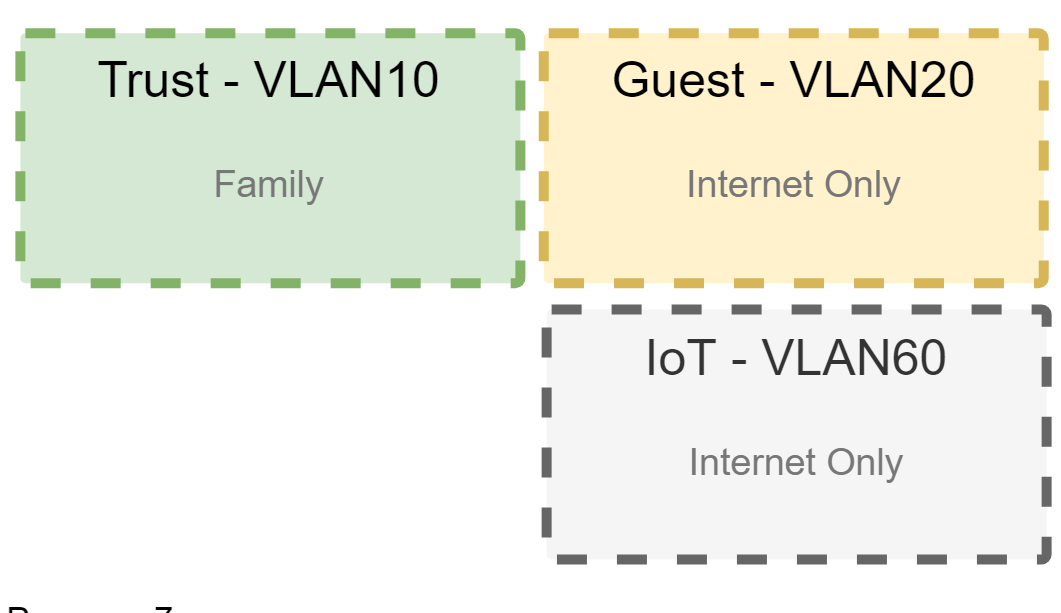
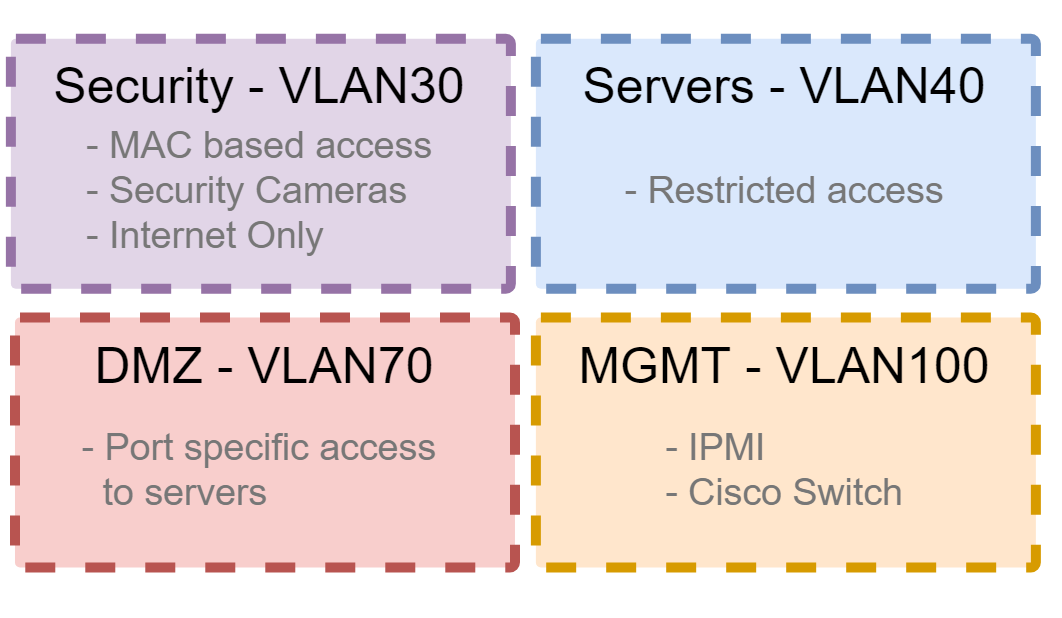
- Figure out with a Network Diagram how you want to structure your network. I first looked up other people's diagrams on reddit as a frame of reference when it comes to VLANS and network segregation. You can set your network up as 10.VLAN.xxx.xxx. It also helps see what other services to check out.
- Update all firmware
- I would suggest setting up DHCP,VLANS, DNS, and VPN on OPNSense. I chose to setup a DynamicDNS (DDNS) just because I don't want to purchase a static IP from my ISP and don't want to hassle with it if I end up moving and getting a new ISP. For the VPN I went with WireGuard.
- Visit this site and start up a wiki.js container. https://tteck.github.io/Proxmox/ Use the Proxmox VE Tools scripts for cleaning up the environment for Post Install that will get rid of the warning popup and configure the correct repository.
- Install the document/notes container and try out which one you like most. The one I am currently using is Wiki.js which powers this site!
- After you have installed Proxmox on your machine I would suggest setting up SPICE. When you run a VM in a seperate window using the ">console" button, you can bring up a virtual screen of the VM. SPICE is another type of virtual screen which will allow you to copy paste from between the host and VM. Extra handy when you are installing and configuring multiple different tools!
From here you can start your own documentation journey to help you
Have to use "balenaEtcher" instead of "Rufus" when making a bootable USB for proxmox. Rufus uses a grub loader which doesn't work for some reason Unless you use it in 'dd' mode
In starting all of this You might want to setup the SPICE console so that it will be easier for you in the future as you will then be able to copy and paste into your VMs
Enable VLAN routing by going to Proxmox - Network - enable VLAN
Installing SPICE will allow you to copy paste into terminals which will be useful.
SPICE Client Download - https://www.spice-space.org/download.html
"I was able to get Spice working as well. Added a firewall rule at the Proxmox server level. For anyone else trying to get it working, the firewall rule I added:
Direction: In
Action: Accept
Macro: SPICEproxy
Source: I added my internal subnet to limit access.
Thanks again UEF-ACU."
How do you want to do a naming convention
ID:
1 CT
3 Passthrough VM
4 testing VM
6 BSD and misc OSes
7 Windows
8 Linux
9 Templates
second digits being IP?
9 digits allowed
¶ Creating a Network Diagram
Network Design Concepts: https://www.youtube.com/watch?v=s9Qh9fWeOAk
Use draw.io to make a Network Diagram
¶ VLANs
Going to be segregating network using Vlans. Can either be done on OPNSense or Proxmox itself or both.
I'm going to go with OPNSense since that is the router. For ease of use going to use 10.0.0.0/8 range as vlans can be 10.VLAN.0.0/8 and shorter numbers to type 
Could do a managed switch?
VLANs
10 = servers
20 = end devices
30 = guest
40 = media?
50 = work
99 = management
¶ Firewall with OPNSense
Hardware recommended page for the IDS/IPS Zenarmor. Part of using the OPNSense OS as a router/firewall is being able to use a IDS/IPS as well. https://docs.opnsense.org/vendor/sunnyvalley/zenarmor_hardwarerequirements.html#
Installing OPNSense using a full VGA image type.
https://opnsense.org/download/
I used BalenaEtcher to make a bootable USB.
Documentation for OPNSense
https://docs.opnsense.org/manual/install.html
All the good stuff for OPNSense
https://www.youtube.com/watch?v=UI5tO1hP2q8&t=85s
Starting from jim garage
Create a host...
firewall, Aliases:
He used OpnSenseVM1. made a firewall alias.
Tie the alias to a DHCP lease (ip address) [What if dynamic ip?]
That is why you don't give servers dynamic IPs.
can create a 'static lease' to the server. Can use a MAC address and/or IP address
I think in this setting is where we NAME the device that DNS uses.
Zenarmor is an application based firewall. Go through the configuration wizard. Link for steps. https://docs.opnsense.org/vendor/sunnyvalley/zenarmor_install.html
Looking into the settings of Zenarmor...
DNS Enrichment?
How Zenarmor works... https://www.zenarmor.com/docs/guides/how-zenarmor-works
Zenarmor processes incoming packets (L2-L4) first before OPNSense.
OPNSense processes outgoing packets (L4) first before Zenarmor.
First define L4 rules on OPNSense. Then configure Zenarmor application and web filtering (L7)
¶ IDS and IPS
https://homenetworkguy.com/how-to/configure-intrusion-detection-opnsense/
https://docs.opnsense.org/manual/ips.html
https://forum.opnsense.org/index.php?topic=21417.0
¶ OPNSense DHCP and DNS
Proper Adguardhome and unbound config.
https://www.reddit.com/r/OPNsenseFirewall/comments/154wzhb/correct_way_to_do_dns_with_unbound_and_adguard/
Possibly use this for help seeting up Adguardhome?
https://samuelsson.dev/install-adguard-home-on-an-opnsense-router/
From within OPNSense you can add a bunch of plugins.
Use Unbound as your recursive DNS resolver.
When you go to a website on the internet and your DNS does not know the address, it will forward the request to a DNS resolver to look for the answer for you and then cache the results. The person who controls the DNS resolver could get an idea of the sites you visit. They will also have your SNI data. SNI deals with TLS handshake.
https://www.cloudflare.com/learning/ssl/what-is-sni/
Will be routing DNS traffic through a VPN.
opnsense ddclient would be DNS and would ask for additional DNS questions to Unbound.
On setting up DDNS - https://www.reddit.com/r/opnsense/comments/1bgdqx0/how_to_set_up_cloudflare_dynamic_dns_ddns_in/
Above was used for better DNS security.
I am a bit uncertain when it comes to using ddclient as the backend as in the OPNsense Documentation it states:
"With ddlient developments sunsetting [*] we decided to offer an alternative written in Python. Selecting the native backend replaces the employed implementation. If your service is supported, we do advice to try out the new native backend which also offers support for custom HTTP requests."
Trying to get DDNS working....
Documentation says to use Global API key though that is not suggested as t is legacy. use API token instead.
Leave username blank.
After purchasing a domain name from Cloudflare, on the dashboard go to 'DNS' and place your DNS records there so that your website will resolve!
Here is a good write-up of all the dns configurations in OPNsense.
https://homenetworkguy.com/how-to/confused-about-dns-configuration-in-opnsense/
Some reddit guys config
https://www.reddit.com/r/opnsense/comments/1bgdqx0/how_to_set_up_cloudflare_dynamic_dns_ddns_in/
Adguard home
https://0x2142.com/how-to-set-up-adguard-on-opnsense/?utm_source=YouTube&utm_campaign=opnadguard
¶ Additional router project
Setup OPNsense firewall with automatic configuration backups to google drive.
¶ Cloudflare Configuration
https://developers.cloudflare.com/learning-paths/get-started/
Web Analytics Automatic Setup
Security Center
Security Insights
Infrastructure
Maybe use Trace for detailed analysis of website configuration
Turnstile = website captcha, unsure on setup
Maybe try to setup Zero Trust? Makes strict identity verification for every person and device trying to acess resources.
Turn on 2FA and enforce all members to have 2FA to access cloudflare account.
Quickstart guide within domain. Enable automatic HTTPS.
Added DMARC Management Email Record to prevent email spoofing.
Force users to use TLS 1.3 (most up to date TLS)
Under the domain -> Security -> Bots. Enable 'Bot Fight Mode' to make it harder for web crawlers
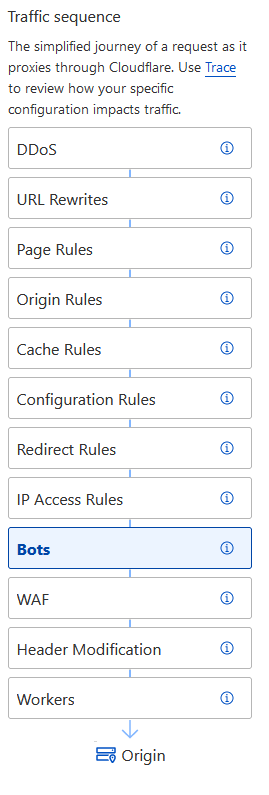
Could just go to overview page, quick actions, basic features, activate
Look more into Security WAF, Security Settings, Access for Zero Trust
Maybe enable Caching -> Cache Reserve
Scrape Shield Hotlink Protection?
SSL/TLS Origin Server certificate?
How to setup Cloudflare SSO?
Do I want a different DNS setup instead of: DNS Full?
After all of this look at Speed -> Optimization
¶ VPNs (WireGuard)
IN MAINTENECE DUE TO CONFIG REDO
GOING TO WAIT FOR NEXT MAJOR UPDATE OF OPNSENSE TO START IMPLEMENTING
https://www.linuxserver.io/blog/2019-11-16-setting-up-wireguard-on-opnsense-android
Best 'up to date' video
https://www.youtube.com/watch?v=nlJTz2Am6lc&list=WL&index=4
Using Wireguard within OPNSense for Internal VPN.
What is an internal VPN?
create a user using a public key
You would be creating a 'peer' that you would be authenticating as and what it is allowed to connect to.
Would then need to assign VPN to an interface?
Would create an outbound rule if you want to access internal network from outside (WAN)
Would use OpenVPN for guests when they connect to my internal network?
Would need to download config files for VPN used....NordVPN....
for an inbound vpn (aka a vpn server) - then other people connect in to you.
for an outbound vpn (aka a vpn client) - then you connect out to someone else.
Currently using 10.10.10.1/24 for Wireguard tunnel
tried to use these "how to's"
https://docs.opnsense.org/manual/how-tos/wireguard-client.html
https://www.wireguard.com/install/
Though most of it was from this video:
https://youtu.be/UI5tO1hP2q8?si=hFSUdHuen_ASNBM-&t=1661
¶ Installing SPICE
SPICE is a client application to connect to a VM that also allows sharing a clipboard from the host to VM. (copy paste)
https://virt-manager.org/download.html
....
Idk man... watch some youtube video...
I ended up installing the virt-manager which got me a screen
Then I installed the 'spice-guest-tools' which then made it so i can't see shit....Accidently installed 32bit x86. 64bit version works fine. Change Video RAM to 32MB for bigger screen.
¶ Virtual Machines and Templates
So I had forgotten the password to the VMs I had created....so I had to recreate them. I think it may be best to create a template of a freshly installed VM and have the password be the same as the username. Remember you can write notes in ProxMox on each VM
¶ Windows VMs
Windows VMs need special care because Windows likes to be a little princess.
Windows VMs like to take all memory allocated and say it is all used even if it is only using 4GB
Read up on VirtIO drivers, QEMU agents, and maybe this page. https://pve.proxmox.com/wiki/Dynamic_Memory_Management
https://www.youtube.com/watch?v=6c-6xBkD2J4
https://www.youtube.com/watch?v=fupuTkkKPDU
¶ Templates
Make a template of a VM.
Linked Clone enables Deduplication and saves Hard drive space.
Full Clone means recreating another hard drive OS.
How would you go about these steps
Create a template of Liux Ubuntu 20.12
can have update script run maybe afterwards on boot?
New upgrade version comes out
Now creating and udating and upgrading takes too long
Make a newtemplte from old. Update and Upgrade
What do you do with the linked clone Ms created from od template?
What would need to be done in order for me to remove/delete old template?
All linked clones would break if deleted template
How to make linked clones transferable?
Would I need some SSO deal so I can avoid 1 VM = 1 User?
Like an accounting user has files saved on desktop or somewhere not on a shared network drive....Force network drive?
¶ NUT UPS
NUT (Network UPS Tool) is used to see the stats for a UPS. how much batterytime is left, load, provide Wake on Lan. This was placed on a raspberry pi, the Idea is that once a power outage is detected and the UPS is >90% then the server will begin a shutdown. It will take a bit of time and will safely shutdown everything. The raspberry pi will suck out the rest of the power slowly waiting for power to come back on. Once the battery is back to 100% the NUT server will send a WoL packet to the server booting it back up.
¶ Diagnosis page locks WebUI
Have you ever found a solution for this ? I have the exact same issue with a brand new install of OPNsense. I have 2 OPNsense boxes in high availability, and the UPS is connected via USB to the backup node.
The backup node can view the diagnostics perfectly fine, but the primary node's webui hangs as soon as I go into the NUT "diagnostics" and the only solution is to reboot it from the CLI. Its sad because it was working fine as long as the backup node was still on pfsense 
i0nviz
•
4mo ago
Oh well... just found out the issue. I had to do a port forward on the host that has the UPS connected, and now its all working !
¶ Create a GitHub account
GitHub will be used for housing a repository of all the code that you will be making/customizing from other projects.